

From first read to off book.
Three steps, and you have a scene partner whenever you need one, on the bus, in the dressing room or the night before an audition.
- 1
Add your script
Upload the file you have, from a PDF to Final Draft, or paste the text. AI finds the scenes, the characters and your lines.
- 2
Pick your part
Choose who you play. RHRS reads every other character in a natural voice.
- 3
Rehearse out loud
Say your lines when it is your turn. RHRS listens and lets you know when you have a line right, until you are off book.
Read it. Hear it. Rehearse it.
Every scene has three modes, so you can go from the first read to off book in one place.
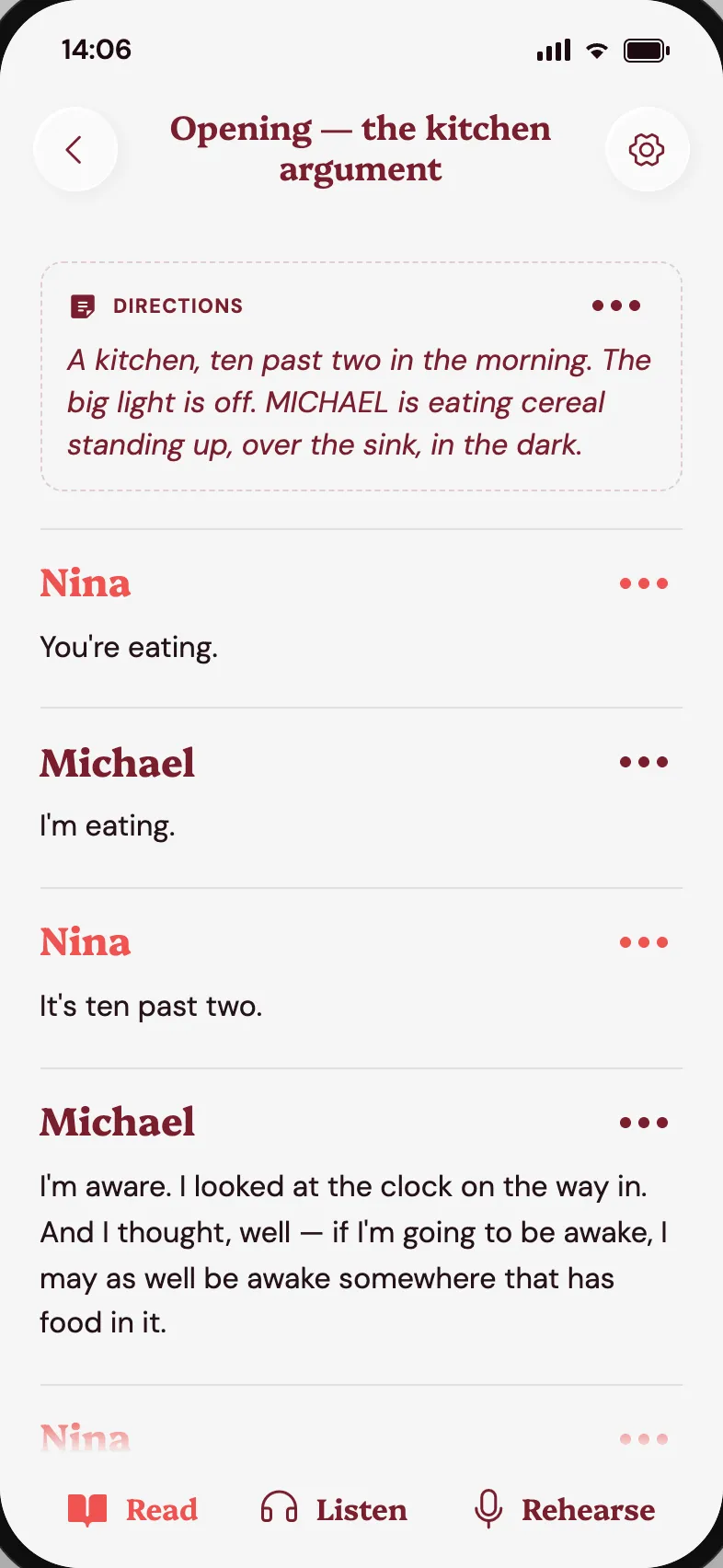
Read
Your script, split into scenes, with your lines marked. Add private notes and keep the stage directions in view.
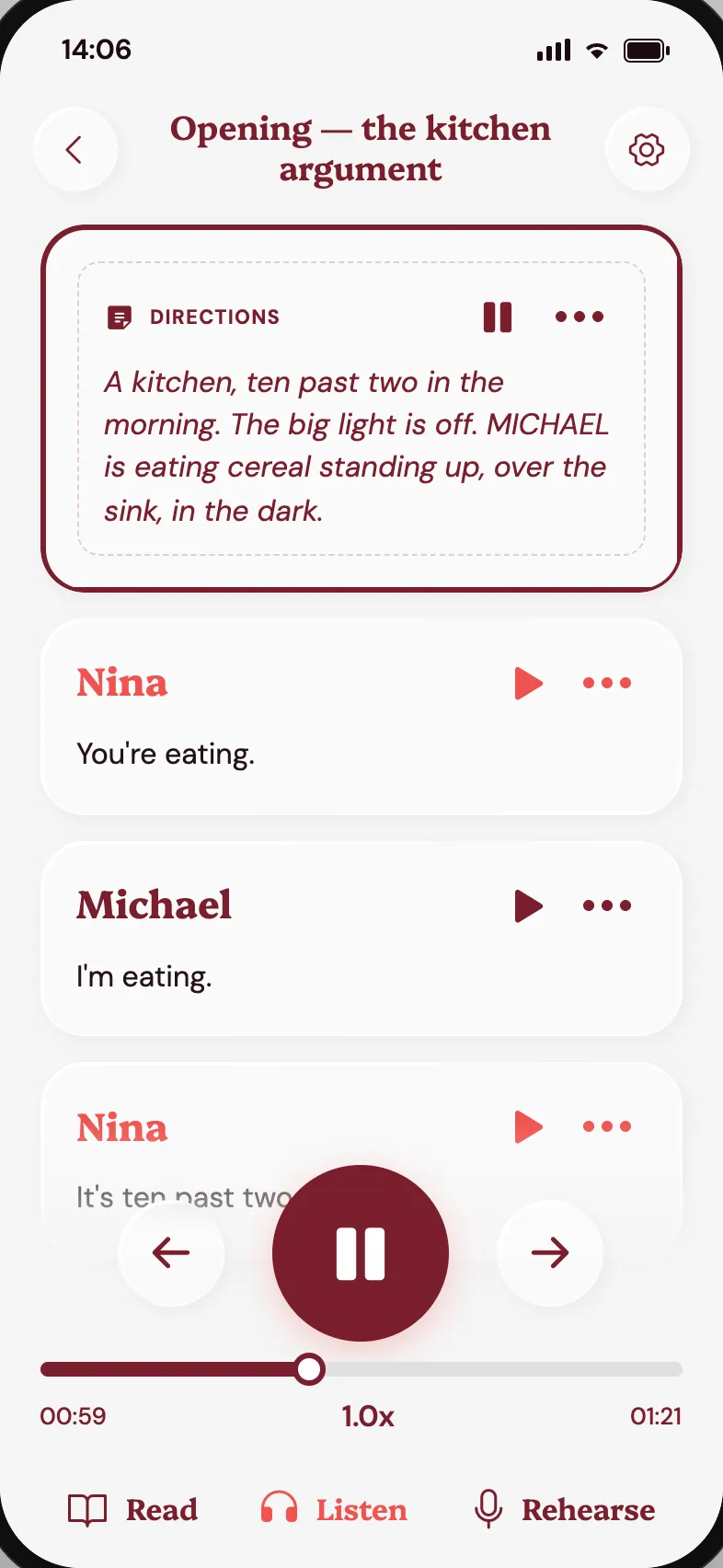
Listen
Hear the whole scene, your lines included. It keeps playing with the phone locked, for the commute or a walk.
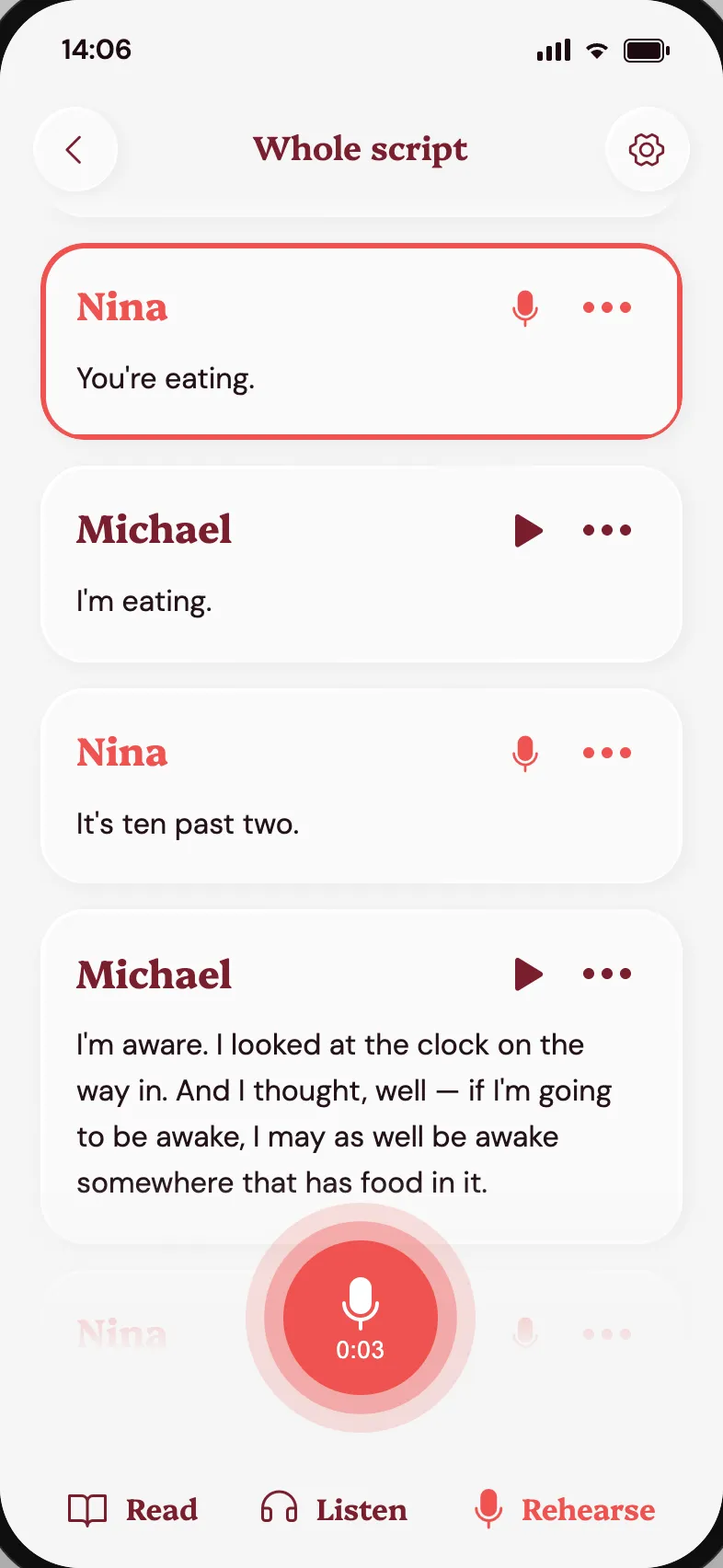
Rehearse
Say your lines out loud. RHRS gives you your cues, listens to you and lets you know when you have a line right.


Bring the script you already have.
No retyping, no special format. AI reads your file and finds the scenes, characters, lines and stage directions, and you can check and fix the result. Stage plays, film and television scripts all work, or you can simply paste the text.
- DOCX
- DOC
- Final Draft (.fdx)
- Fountain
- RTF
- TXT
- Markdown
- EPUB
- MOBI
- ODT
- Pages
- and many more
Rehearse in your language.
Your script can be in any of 84 languages. RHRS reads it, voices the other parts and checks your lines in the language the play is written in.
 Chinese (Mandarin)中文
 CzechČeština
 DutchNederlands
 English
 FrenchFrançais
 GermanDeutsch
 Hindiहिन्दी
 ItalianItaliano
 Japanese日本語
 Korean한국어
 PolishPolski
 PortuguesePortuguês
 SlovakSlovenčina
 SpanishEspañol
 SwedishSvenska
 TurkishTürkçe
 UkrainianУкраїнська
Bring your scene partners with you.
Rehearsing a production? Invite your castmates to the same script. Each of them records their lines once, and you all rehearse against each other's real voices, with their timing and their pauses.
Record once, everyone hears it
A guided flow takes each actor through the lines they still need to record.
No gaps while the cast catches up
A natural AI voice reads any line that has not been recorded yet.
Double-cast? Pick who you hear
When two actors share a part, choose whose recording you rehearse with.
Your production, in every actor's pocket.
Running a production or teaching a class? Keep one version of the script, and your cast arrives at every rehearsal knowing it. We are working with the first companies and drama schools on access for whole groups.
Get in touchOne set of stage directions
Write and update the blocking in the app. Every actor sees the same version, not a marked-up copy from three weeks ago.
Change it in the room
Cut a line or rework a scene from your phone during rehearsal. Everyone gets the new text straight away.
See who is ready
Know which actors have recorded their lines, and remind the ones who have not.
Cast with confidence
Assign parts, double-cast a role, or recast when someone drops out, without redoing anything.
Questions, answered
What is RHRS?
RHRS, pronounced "Rehearse", is a mobile app that helps actors learn their lines. It reads the other characters' lines out loud, waits for your cue and listens to you, so you can rehearse a scene whenever you want, without a reading partner.
Who is RHRS for?
Actors at every stage, from drama students learning their first scene to professionals preparing an audition, a self-tape or a new part. A whole cast can also use it together.
Do I need a scene partner?
No. RHRS reads every other part with natural AI voices. If your castmates join the same script and record their lines, you can rehearse with their real voices instead.
How does RHRS help me learn my lines?
In Rehearse mode you hear your cue, say your line out loud and RHRS lets you know when you have it right. Listen mode plays the whole scene, your lines included, so you can keep learning on the go.
Which file formats can I upload?
PDF, Word (DOCX and DOC), Final Draft, Fountain, RTF, plain text, Markdown, EPUB and other e-book formats, and more. You can also paste the text directly. AI finds the scenes, characters and lines, and you can check the result.
Which languages does RHRS support?
The app itself is in English for now, but your script can be in any of 84 languages, from Spanish, French and German to Czech, Polish, Japanese and Hindi. See the full list of languages.
Does it work for film and television scripts?
Yes. RHRS handles stage plays as well as film and television scripts. Musicals and opera are not supported yet.
Does RHRS work offline?
Once a script and its recordings are on your phone, you can read and listen to it anywhere. Checking your lines while you rehearse needs an internet connection.
How much does it cost?
RHRS is free while it is in testing. We will announce pricing before the public launch, and early testers will hear first.
When can I use it?
RHRS is in private testing and is coming to iOS and Android. Leave your email on this page and we will tell you as soon as it is available.
Are my scripts private?
Your scripts and recordings belong to you. Only the people you invite can see them, and they are never used to train AI models. The Privacy Policy has the details.
Can I rehearse with my cast?
Yes. Invite your scene partners to the same script by email. Each actor records their own lines once, and everyone rehearses with the real voices of the rest of the cast.
What happens before everyone has recorded their lines?
A natural AI voice reads any line that has not been recorded yet, so you can rehearse from day one. As your castmates record, their voices replace it.
What if the script changes during rehearsals?
Whoever runs the script edits it in the app and everyone gets the new version straight away. Only the lines that changed need to be recorded again.